Basic VLAN switching
Many MikroTik devices come with built-in switch chips that support hardware-level VLAN switching. This enables wire-speed performance when using VLANs, provided the appropriate configuration method is employed. Since the configuration method varies across different models, this guide focuses on setting up a basic trunk/access port with a management port from the trunk port using different devices with the right configuration to achieve the best performance and to fully utilize the available hardware components.
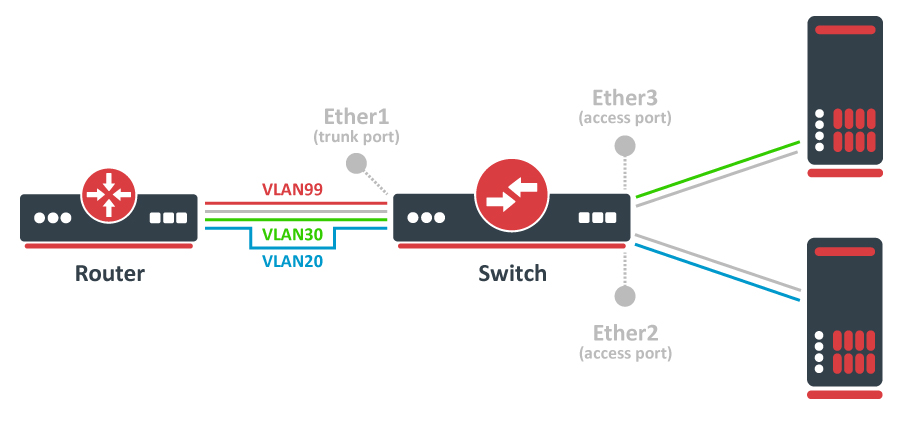
MikroTik devices with Marvell Prestera switch and RTL8367, 88E6393X, 88E6191X, 88E6190, MT7621, MT7531 and EN7523 switch chips
/interface/bridge
add name=bridge1 frame-types=admit-only--tagged
/interface/bridge/port
add bridge=bridge1 interface=ether1 frame-types=admit-only--tagged
add bridge=bridge1 interface=ether2 pvid=20 frame-types=admit-only-untagged-and-priority-tagged
add bridge=bridge1 interface=ether3 pvid=30 frame-types=admit-only-untagged-and-priority-tagged
/interface/bridge/vlan
add bridge=bridge1 tagged=ether1 vlan-ids=20
add bridge=bridge1 tagged=ether1 vlan-ids=30
add bridge=bridge1 tagged=ether1,bridge1 vlan-ids=99
/interface/vlan
add interface=bridge1 vlan-id=99 name=MGMT
/ip/address
add address=192.168.99.1/24 interface=MGMT
/interface/bridge
set bridge1 vlan-filtering=yes
More detailed examples can be found here.
RTL8367, 88E6393X, 88E6191X, 88E6190, MT7621, MT7531, and EN7523 switch chips can use hardware-offloaded VLAN filtering starting in RouterOS v7.
Bridge ports with frame-types set to admit-all or admit-only-untagged-and-priority-tagged will be automatically added as untagged ports for the pvid VLAN.
CRS1xx/CRS2xx series switches
/interface/bridge
add name=bridge1
/interface/bridge/port
add bridge=bridge1 interface=ether1
add bridge=bridge1 interface=ether2
add bridge=bridge1 interface=ether3
/interface/ethernet/switch/ingress-vlan-translation
add ports=ether2 customer-vid=0 new-customer-vid=20
add ports=ether3 customer-vid=0 new-customer-vid=30
/interface/ethernet/switch/egress-vlan-tag
add tagged-ports=ether1 vlan-id=20
add tagged-ports=ether1 vlan-id=30
add tagged-ports=ether1,switch1-cpu vlan-id=99
/interface/ethernet/switch/vlan
add ports=ether1,ether2 vlan-id=20
add ports=ether1,ether3 vlan-id=30
add ports=ether1,switch1-cpu vlan-id=99
/interface/vlan
add interface=bridge1 vlan-id=99 name=MGMT
/ip/address
add address=192.168.99.1/24 interface=MGMT
/interface/ethernet/switch
set drop-if-invalid-or-src-port-not-member-of-vlan-on-ports=ether1,ether2,ether3
More detailed examples can be found here.
Other devices with a built-in switch chip
/interface/bridge
add name=bridge1
/interface/bridge/port
add bridge=bridge1 interface=ether1
add bridge=bridge1 interface=ether2
add bridge=bridge1 interface=ether3
/interface/ethernet/switch/vlan
add ports=ether1,ether2 switch=switch1 vlan-id=20
add ports=ether1,ether3 switch=switch1 vlan-id=30
add ports=ether1,switch1-cpu switch=switch1 vlan-id=99
/interface/vlan
add interface=bridge1 vlan-id=99 name=MGMT
/ip/address
add address=192.168.99.1/24 interface=MGMT
/interface/ethernet/switch/port
set ether1 vlan-mode=secure vlan-header=add-if-missing
set ether2 vlan-mode=secure vlan-header=always-strip default-vlan-id=20
set ether3 vlan-mode=secure vlan-header=always-strip default-vlan-id=30
set switch1-cpu vlan-header=leave-as-is vlan-mode=secure
More detailed examples can be found here.
:::info Applicability & Scope This configuration is intended for RouterBOARD series devices (RB4xx, RB9xx, RB2011, RB3011, hAP, hEX, cAP, etc.).
Not all devices with a switch chip support hardware-level VLAN switching. If a device has VLAN table support, it can use the built-in switch chip. Check your chip's capability using /interface/ethernet/switch/print or the compatibility table.
:::
:::warning Hardware Limitations & Configuration Rules
- Multiple Switch Chips: On devices with multiple chips (e.g., RB2011, RB3011, RB1100), VLAN traffic is only hardware-switched between ports on the same chip. Bridging ports across different chips means VLANs will not be filtered at the hardware level. To bypass this, either connect a physical cable between the chips, or use Bridge VLAN Filtering (which disables hardware offloading).
- QCA8337 & Atheros8327 Chips: You must leave the default
vlan-header=leave-as-isproperty. The switch chip uses thedefault-vlan-idproperty (which should only be applied to access/hybrid ports) to assign untagged ingress traffic to a VLAN. - RSTP Conflict: By default, bridge interfaces use
protocol-mode=rstp. On certain devices, this disables hardware offloading. Check the Bridge Hardware Offloading section for supported features. :::
Other devices without a built-in switch chip
It is possible to do VLAN filtering using the CPU; there are multiple ways to do it, but it is highly recommended to use bridge VLAN filtering.
/interface/bridge
add name=bridge1 frame-types=admit-only--tagged
/interface/bridge/port
add bridge=bridge1 interface=ether1 frame-types=admit-only--tagged
add bridge=bridge1 interface=ether2 pvid=20 frame-types=admit-only-untagged-and-priority-tagged
add bridge=bridge1 interface=ether3 pvid=30 frame-types=admit-only-untagged-and-priority-tagged
/interface/bridge/vlan
add bridge=bridge1 tagged=ether1 vlan-ids=20
add bridge=bridge1 tagged=ether1 vlan-ids=30
add bridge=bridge1 tagged=ether1,bridge1 vlan-ids=99
/interface/vlan
add interface=bridge1 vlan-id=99 name=MGMT
/ip/address
add address=192.168.99.1/24 interface=MGMT
/interface/bridge
set bridge1 vlan-filtering=yes
More detailed examples can be found here.